Really easy to use! The colorwork chart tool is great too. Can't wait for a mobile version.
Built stitch by stitch, by a knitter
The all-in-one
knitting journal app
Record your work and collect inspiration in one place.
Your knitting life will be more enjoyable.
What early users are saying
Hear from beta testers
who tried it first.
I love it so much, I've been adding everything non-stop!
I'd tried many sites for colorwork charts, but saving them as proper projects was always a hassle. Having all this built in was a pleasant surprise. The Idea tab makes everything so easy to manage — if you design your own colorwork, you'll use this a lot.
It'll be fun organizing things one by one.
Wow, you've packed everything I needed in one place!
The layout is so well thought out!
Sound familiar?
Knitting notes scatter across apps and notebooks,
and before long,
organizing them feels impossible.
With crochet and knitting projects all mixed together, I have to dig through my stash every time to check what yarn I have and how much is left.
Yarn info, stock & usage trackingEvery pattern has notes to keep track of, rows to count, and English patterns need translating every time.
PDF pattern auto-translation & highlightsI want to organize finished project photos — and the inspiration that got me there.
Idea notes & screen-capture archiveThe all-in-one desktop app
for knitters.
Really, it's all here.
From the essentials to knitting event logs
and idea notes — everything a knitter needs,
all in one place.

Your knitting life, all in one place
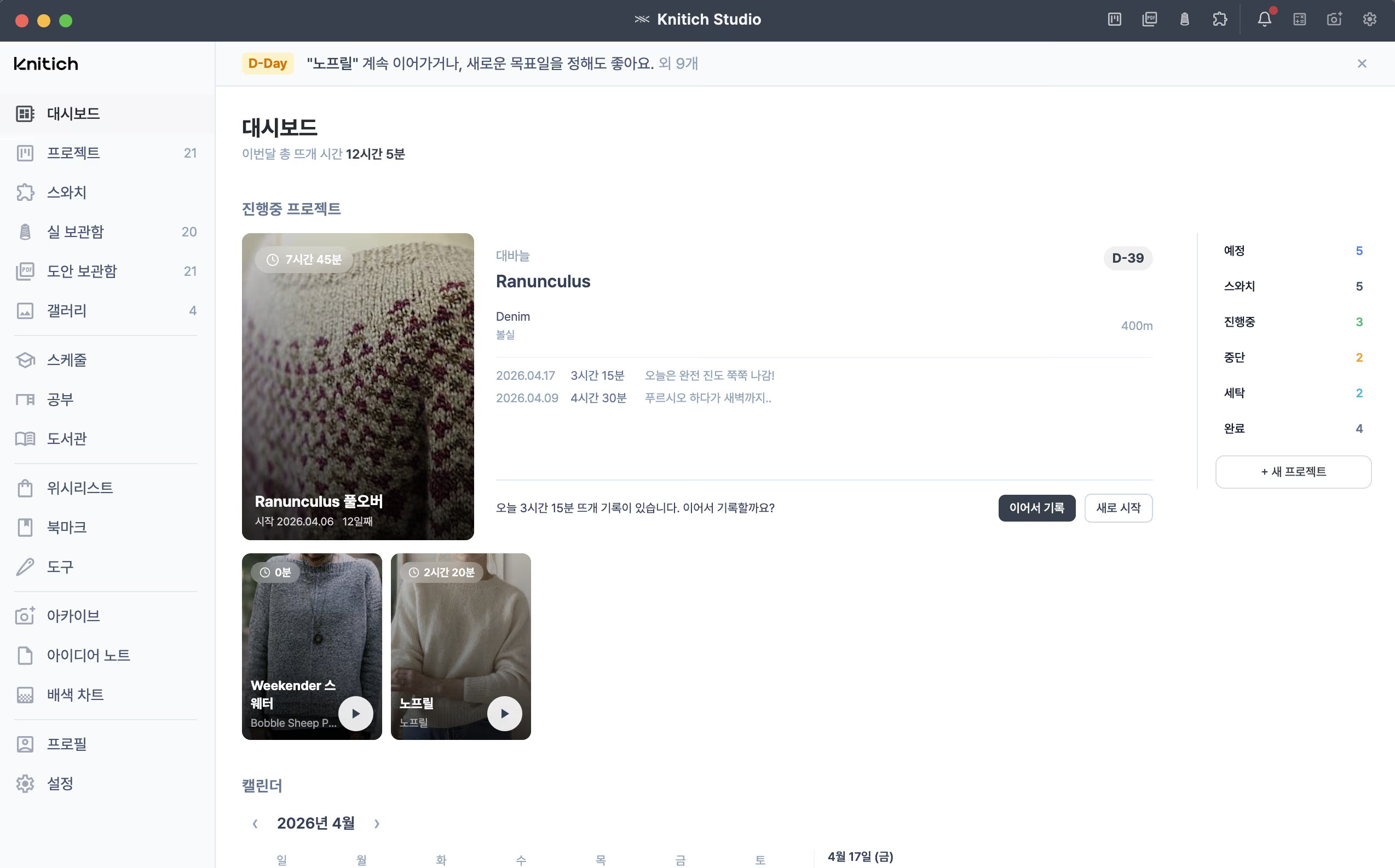
See project progress at a glance and decide what to work on next in seconds.

Open the app, keep on knitting
Pick up right where you left off, and let the timer track how long you've been knitting over time.

Mark up patterns in place
Drop highlights and row-counter markers anywhere, and let auto-translation untangle complex patterns.

No more searching mid-project
Attach reference videos for tricky techniques to each pattern, ready when you need them.

Never lose a moment of inspiration
Link screen captures and colorwork charts to idea notes — a tidy reservoir of inspiration for your next project.

Your events and wishlist, in order
Set priority wishlists, and log one-day classes or knitting meetups so you never miss a thing.
Bonus. Change the app theme color
and dashboard cover image to
make the workspace your own.
Get started in 3 steps
Organize your projects in just 5 minutes.
1
Register the yarn and patterns you have.
Bulk-add multiple yarns and
import multiple PDF patterns at once
for an easier start.

2
Link them to a project.
Connect a pattern and yarn to start a project.
When you begin knitting,
you're taken straight to the linked pattern.

3
Finish and everything sorts itself.
Completing a project deducts the yarn used
and places the piece in your Gallery.

Frequently Asked Questions
Is it really free?
Yes, Knitich Studio is currently free. You can use all features without any in-app purchase.
Can both crochet and knitting users use it?
Yes, both crochet and knitting work can be recorded in the Project screen. You can freely register swatch info and gauges in the Swatch menu, and the Pattern library manages PDF patterns, images, and link-based patterns together.
Why should I choose Knitich Studio as my knitting journal?
Knitich Studio is a knitting app I started building because, as a knitter myself, I found managing my yarn and patterns difficult. I built the Yarn Stash so I no longer have to dig through my stash to check how much is left. I added a translation feature to the PDF viewer to reduce the hassle of translating overseas patterns each time.
I placed highlight and comment tools over the viewer so I can mark only my size in the pattern, and added a row counter that tracks "repeat N times" to remove the pain of counting repeatedly.
Images can be auto-converted into colorwork charts and linked directly to patterns. A project timer records how much time you invest, and finished pieces are preserved in the Gallery as your personal collection.
The biggest advantage is that all your knitting records — previously scattered across apps and notebooks — can be kept in one place.
Can I translate English patterns too?
Yes, the PDF pattern viewer can automatically translate English patterns. You can leave highlights directly on the pattern and place row-counter markers anywhere.
If a technique is tricky, register a reference video in the Study menu and attach it to the pattern. The video link will appear automatically when you view the pattern, so you don't have to search each time.
Can I design colorwork charts too?
Yes, Knitich Studio has a built-in colorwork chart editor. You can freely draw patterns in a dot-grid format, and link your charts to the Idea notes as inspiration for future projects.
You can also export charts as JSON files and share them with other Knitich users, who can open and edit them in their own Knitich Studio.
How can I track my knitting time?
When you register a project and start knitting, the knitting timer turns on and takes you to the linked pattern. The timer is a floating window that stays visible even when you minimize the app and work on other things.
Your knitting time accumulates so you can see exactly how long a project took, and you can leave small daily notes to record your knitting journey.
How is my yarn stash and usage managed?
Register your yarn stash and, when a project is completed, the linked yarn's usage is automatically deducted. You can see at a glance how much of each yarn remains and which project it went into.
Yarn with less than 50m left is automatically tagged as "Scraps", and yarn at 0m moves to the "Used up" tab.
Where is my data stored?
All data is stored only on your own computer. After a one-time Google sign-in for user identification, the app runs fully offline with no server uploads.
Does it work on both Mac and Windows?
Yes, both macOS and Windows are supported, with the same experience across both platforms.
Is there a mobile (iPhone / Android) app?
Currently Knitich Studio is available only as a macOS and Windows desktop app. A mobile release is being considered based on user feedback, but offering the same experience as desktop would be difficult — features like the PDF pattern viewer are optimized for a larger screen, and since all data is stored locally on the user's computer, syncing with mobile would require preserving that privacy model. For now, we're focused on refining the desktop experience.
What happens to my data when I update the app?
Data is automatically migrated to the latest version when you update. Your existing data is preserved. If the app is running, please quit it before updating.
I can't download on Windows.
"This file isn't commonly downloaded" warning
Click the download icon in your browser, then click the "⋯" button and choose "Keep" to finish the download.
AhnLab V3 Lite "Show more" not responding
Wait a moment after downloading and try opening the file again (it may still be scanning). In the "Choose how to handle this file" dialog, click "Run with file-hash exception".
Windows SmartScreen warning
On the "Windows protected your PC" screen, click "More info" and then "Run anyway".
Open your own
knitting studio
right now
5 minutes to install, 5 minutes to start your first project.
Free to download and use.
100% free · Google sign-in required